
Our verdict
Excellent managed WordPress hosting, at a premium price
Best for: Businesses, agencies and busy WordPress sites that need speed and expert support
Pros
- Fully managed WordPress: updates, security and backups handled
- Fast, consistent performance with built-in caching and CDN
- One-click staging and development environments
- WordPress-specialist 24/7 support
- Strong security and daily backups
Cons
- Much more expensive than shared hosting (from $28/mo)
- Plans are limited by monthly visits and storage
- Some plugins are not allowed
- No email hosting included
Score breakdown

On this page
WP Engine is the host many businesses move to when their WordPress site becomes too important to leave on cheap shared hosting. It costs several times more than budget hosts, but in return it takes care of the technical side of running WordPress: speed, security, updates, backups and expert support.
This Managed WordPress Hosting explains what “managed WordPress hosting” really means, what the plans cost, and when the higher price is worth paying.
WP Engine at a glance
| WP Engine | |
|---|---|
| Founded | 2010 |
| Starting price | $28/mo billed annually (Essential) |
| Hosting type | Managed WordPress and WooCommerce |
| Included | SSL, CDN, daily backups, staging, caching, security |
| Support | 24/7 chat from WordPress specialists |
| Not included | Email hosting, domain registration |
What is WP Engine?
Managed WP Hosting is a hosting company that only hosts WordPress. Because it doesn’t have to support every kind of website, it can tune its whole platform for WordPress server configuration, caching, security rules and support training.

“Managed” means WP Engine looks after the jobs that you would otherwise do yourself on a regular host: core WordPress updates, server-level caching, daily backups, malware protection and performance monitoring. You focus on content and your business.
Key features of WP Engine
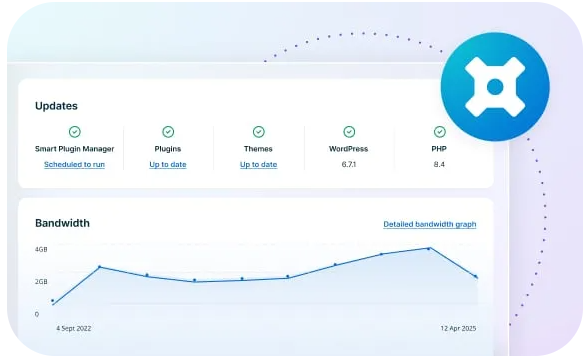
- Managed WordPress: automatic WordPress core updates and optional automatic plugin updates with safety checks.
- Performance: server-side page caching and a global CDN are built in, so you don’t need extra caching plugins.
- Security: free SSL, a managed firewall, threat detection and automatic daily backups you can restore with one click.
- Staging: each site comes with development and staging environments. Test changes safely, then push them live.
- Developer tools: SSH, Git, WP-CLI and a local development tool.
- Themes: access to the Genesis framework and premium StudioPress themes.
WP Engine pricing
WP Engine’s plans are based on the number of sites, monthly visits and storage, rather than on cheap intro deals. Prices checked on October 13, 2026:
| Plan | Price | Sites | Visits per month | Storage |
|---|---|---|---|---|
| Essential | From $28/mo, billed annually ($336/yr) | 1 and up | From ~25,000 | From 10 GB |
| Core | Custom quote | 30–50 | 400,000–800,000 | 50 GB–2 TB |
| Enterprise | Custom quote | 50+ | 800,000+ | 2 TB+ |
WP Engine describes visit counts as estimates, and you can scale up the Essential plan for more sites and traffic. If your site regularly goes over its limits, you may be asked to upgrade, so check your analytics before choosing.
Compared with shared hosting, that’s a big jump: Hostinger’s entry plan is $2.99/month. The difference pays for the management, performance and support. Whether that’s worth it depends on how much your site earns.
Performance
Performance is WP Engine’s main selling point. Its caching layer serves most pages without touching WordPress or the database, and the built-in CDN delivers images and files from locations close to your visitors. Because each plan is sized for a certain traffic level, performance stays consistent during busy periods, which is something shared hosting can’t always promise.
Support
WP Engine’s support team specialises in WordPress, and it’s available 24/7 by chat. That’s useful when a problem is caused by a plugin or theme rather than the server, because agents can help with the WordPress side too. Phone support is available on higher plans.
Limitations
- Price: it’s a premium service and priced like one.
- Disallowed plugins: a small list of plugins (mostly caching and backup plugins that duplicate WP Engine’s own features) aren’t allowed.
- No email: you’ll need a separate email provider.
- Visit and storage limits: plans are sized by traffic, which can mean an upgrade if your site grows quickly.
Who should use WP Engine?
- Businesses whose website generates leads or sales and can’t afford downtime.
- Agencies and developers managing client sites who value staging, Git and reliable support.
- Growing content sites and WooCommerce stores that have outgrown shared hosting.
If you’re just starting a blog or a small brochure site, a budget host such as Hostinger or Bluehost is a better use of your money for now. You can always move to WP Engine later; see WP Engine vs Hostinger.
Our verdict
WP Engine is one of the best managed WordPress hosts available. It’s fast, secure and backed by people who know WordPress inside out. The price puts it out of reach for hobby sites, but for businesses whose website matters, the time saved and the peace of mind are often worth it.
Frequently asked questions
How much does WP Engine cost?
WP Engine’s Essential managed WordPress plan starts at $28/month billed annually ($336 per year). Larger Core and Enterprise plans are priced on request. Checked October 2026.
Is WP Engine worth it for a small blog?
Usually not. For a new or small blog, a budget host such as Hostinger gives you enough speed for a fraction of the price. WP Engine is worth it when your site earns money and downtime or slow pages cost you sales.
Does WP Engine include email?
No. WP Engine focuses on WordPress hosting, so you need a separate email provider such as Google Workspace or Microsoft 365.
Does WP Engine migrate my site for free?
Yes, WP Engine provides a free migration plugin and help to move existing WordPress sites.
Excellent managed WordPress hosting, at a premium price
See WP Engine plans