
On this page
Malwarebytes offers a cybersecurity service that is designed to help ensure the safety of computers, mobile devices and data from the various threats that they may face. While cybercriminals continue to come up with better and more advanced techniques to bypass security measures, having reliable security software has become imperative for sensitive data users, as well as the businesses that they run.
The software protects users from a variety of threats—malware, ransomware, phishing sites, bad downloads and online scams. Malwarebytes also offers an array of extra privacy services, making it an excellent option for users who want to monitor their security.
The question is whether it is worth paying for the software at all, or whether the free version of the product is sufficient. The present review discusses the main functionalities of Malwarebytes, its pros and cons, pricing and tips to consider.
What Are Malwarebytes ?
Malware protection is a cyber-security platform aimed at enabling users to find, prevent, and get rid of malicious software. It is available on Windows, macOS, Android, and iOS; nevertheless, the features depend on which operating system you are using.
Its security packages go beyond simple malware cleanup tools and offer real-time protection from harmful threats. Moreover, the platform offers users some browser protection features and optional privacy and identity protection solutions.
According to online security website, it is an antivirus solution that is enhanced by certain tools that tackle phishing, scams, and other forms of the digital threat.
Features of Malwarebytes
1. Instant Protection from Malware
One of the key advantages of Malwarebytes is that it has an efficient malware detection and blocking system. The program is able to detect viruses, spyware, unwanted programs, and any other kind of malware.
The benefit of real-time protection is particularly important for the users who tend to download files regularly, install apps, or visit unknown websites often. The service would work, however, only if one has the proper subscription and device.
2. Protection from Ransomware and Exploits
Ransomware is malware that can encrypt the files needed by the user and ask for money in exchange for decryption. Malwarebytes comes with tools for ransomware protection only in certain paid packages.
The exploit protection is also there to help in protecting the required Windows operation systems against attacks that exploit the weakness of software. These features provide good protection, however, they cannot eliminate all cyber security problems.
3. Web Protection and Browser Guard
this antivirus protection Browser Guard was created for the purpose of blocking malicious websites, content, advert content, and tracking of users.
The tool can help minimize the risk of becoming exposed to phishing websites and unsafe links. It is especially useful for shopping
Malwarebytes Pricing
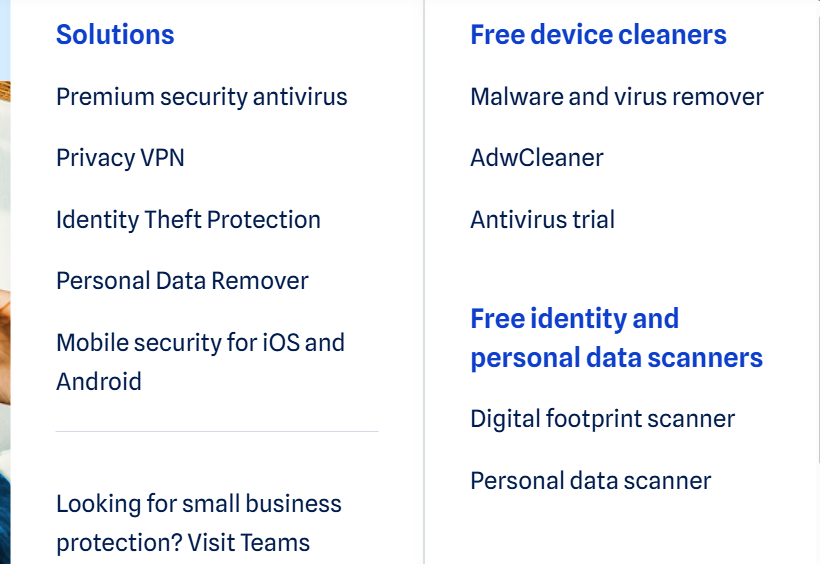
Malwarebytes is a provider of malware removal software that offers customers both a free malware scanning version and paid subscriptions that protect against new malware attacks.
The free version serves those seeking to check their systems for viruses and investigate alarms, while those desiring ongoing protection will appreciate the paid versions. Malwarebytes Free: Free – Basic antivirus scanning and malware removal.
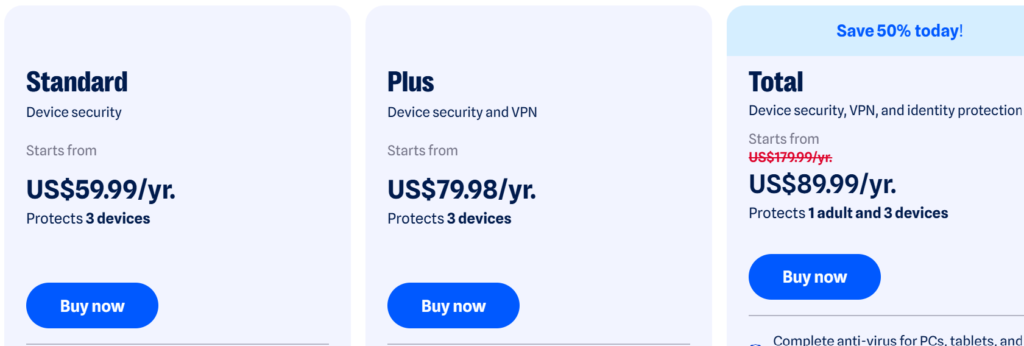
Malwarebytes Standard: $59.99 per year – Protection for 3 devices.
Malwarebytes Plus: $79.99 per year – Provides protection for 3 devices and includes the company’s VPN services.
Malwarebytes Ultimate: $139.99 per year – Provides promotion for 1 person and 3 devices including more security and identity protection features.
There are pros and cons associated with Malwarebytes.
pros of Malwarebytes:
Easy to use interface: The installation, scanning and managing the security are simple to carry out.
Effective malware detection: Able to detect and remove all kinds of malware.
Web security: Browser Guard can block harmful websites and unwanted online contents.
Multi-platform support: Protection is available for all major desktop and mobile OS.
Cons of Malwarebytes
Limited free protection: The free scan lacks continuous protection available with paid subscriptions.
Extra charges: VPN and identity protection may incur additional fees.
Disparity in features: Some features are not available on all platforms.
Cost of subscription: Premium subscriptions may not work well for customers with budget constraints.
No total assurance: Malwarebytes cannot protect against every cyber crime attack, phishing, or breach.
Multiple subscription options: Users can select the subscription that meets their level of security and privacy.
Why Should You Use Malwarebytes?
If you are looking for a simple solution for improving your device security, you should look into Malwarebytes. It is especially useful for those who download files, visit new sites, or need something more protective against web scams.
Using paid plans will benefit families with numerous devices as well as those looking for a solution providing both antivirus and VPN.
Nevertheless, the decision on what security software to choose must go beyond just comparing features. Take into account your operating system, current antivirus software, budget, and specific privacy needs before making your choice.
Is Malwarebytes Superior to Classic Antivirus Software?
Malwarebytes emphasizes malware detection, real-time protection, and prevention against online threats. Additionally, advanced subscriptions offer several privacy features and resources against scams.
Regardless, the best security software is based on your requirements. Some competitors’ antivirus software products contain additional functionality, such as parental control and cloud backup, which may not appear in your Malwarebytes subscription.
Instead of concluding that one product is undeniably better than the others, consider factors such as independent security tests, compatibility, renewal prices, and the features included in subscriptions.
conclusion
Malwarebytes provides a valuable service in terms of safeguarding your device from various threats like malware, ransomware and threats from the world wide web. The free version itself can scan basic features while the paid version provides complete protection as well as multitude of other services.