

Tool like Canva make creating professional-looking graphics easier than ever before, which means that anyone can use them without having to learn advanced graphic design techniques or invest large amounts of money purchasing expensive software subscriptions.
With so many tools currently available on the market, why would people want to continue using this tool for social media management, small business operations, or as an aid for creating presentations?
This article provides readers with a thorough outline of the things that Canva has to offer, where it excels, and whether or not it fits your specific needs.
The First Impression — Clear, Rapid and Easy to Begin
Canva is instantly recognizable. A clean interface, uncomplicated layout, and an emphasis on allowing users to begin working immediately with no learning curve are all elements that contribute to this experience of using Canva.
Unlike more traditional applications like Adobe’s Photoshop, which require lengthy tutorials and years’ worth of experience to develop your skills, Canva removes the complexity that usually accompanies the use of online graphic design applications and focuses instead on how easily and effectively people can use its application.
Once you’ve selected one of Canva’s templates to work from, you simply find a shape that you’d like to insert into your graphic, drag it into your project space, change the text to reflect your message, and in just a few clicks, you’ll create a finished product that looks like a professional-grade graphic! This is what attracts such diverse user groups to use Canva!
If you’re ready to start designing right away, check out our guide: How to Use Canva: 10 Easy and Powerful Steps for Beginners to create your first professional design quickly and confidently.
Features That Make Canva An Excellent Design Tool
Canva is designed as a design program that makes the design process easier to accomplish while still providing high-quality results.
1. Simple-to-Use Editor
The editor on this platform is simple to use. All aspects of moving objects around the page, changing layouts, and customizing your designs can be done seamlessly with the editor.
2. Tons of Templates
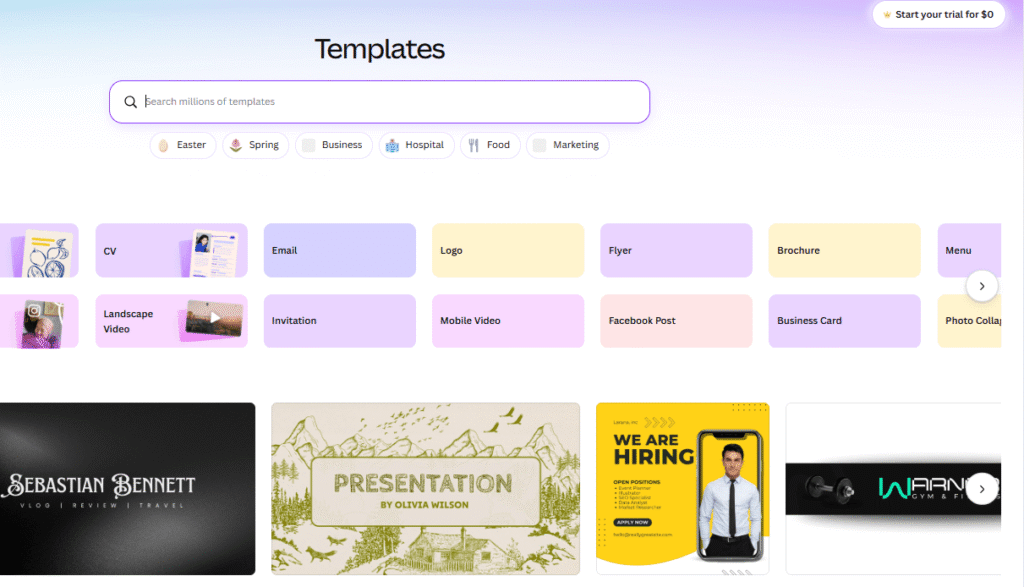
With thousands of templates for just about every purpose including social media graphics, presentations, marketing materials, and educational content; you will not only save time from having to create your own template from scratch but have quality designs right away.
3. Access to AI Design Tools
With the AI capabilities Canva possesses, you will have a lot more creative options available at your fingertips; from ideas, visuals to how quickly they can complete any project within the canvas platform.
4. Access to a Massive Library of Content
It provides you with access to millions of design assets including images, video, icons, and graphics without the need to use a separate program outside of this design tool.
5. Team Collaboration Tools
Canva allows teams to work on projects together. This means they can collaborate with one another without having to wait on each other. It allows teams to easily collaborate with one another to share ideas, provide feedback, and get their projects done quicker.
Why Choose Canva?
Choosing a design tool involves more than just functionality. When looking for an efficient, easy-to-use, and dependable program, Canva has shown to have these attributes regularly and reliably.
Below are some of the many reasons users keep coming back to using this platform:
1) Easy-to-use interface; even someone with no design experience can easily navigate through the program.
2) Drag-and-Drop editing; no technical expertise required to create your designs.
3) Huge library of templates; all designed and ready for quick turnaround times.
4) AI generated tools; to automate ideas, create images, and provide layouts based on input.
Want to look at these templates on your own?
👉 Browse Canva templates here:
5) Accessible across all platforms; use this service on your desktop, tablet, or mobile device.
6) Shareable with team members for collaborative real-time editing purposes.
7) Everything you will need to Design, Edit and Manage your designs is available in one program.
The benefit of having these design tools readily accessible is that you will save precious time, as well as reduce the amount of effort required, to create high-quality design.
Start using Canva for free today and see the difference for yourself.
Canva Pricing: Free vs Pro
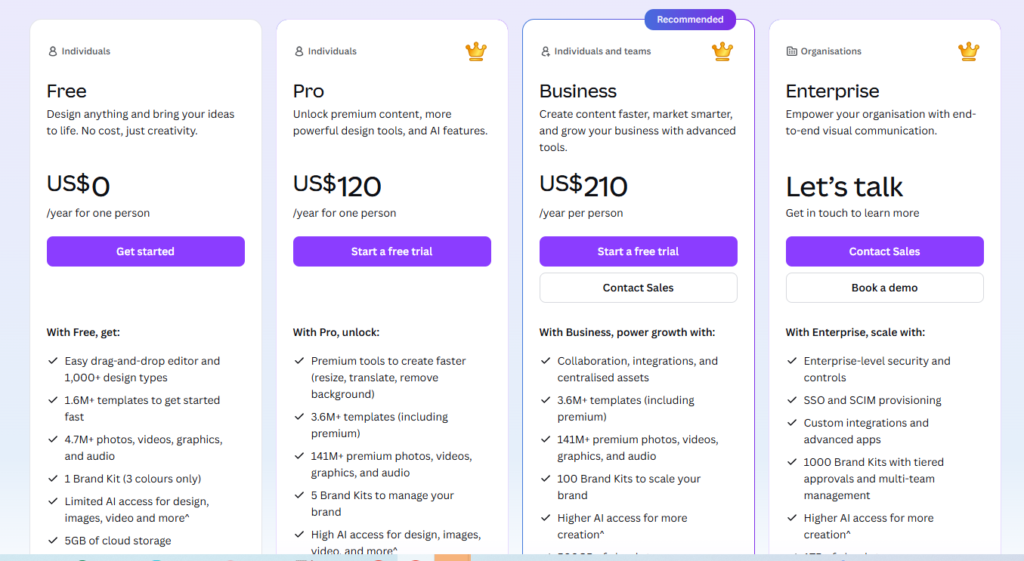
Canva’s pricing structure is flexible in nature and designed to accommodate users with differing needs, whether they are merely beginning on their design journey, or if they have a more established background in design.
Canva Free
The free version of is ideal for individuals just starting in design through to those who may only need an occasional graphic. The free offering provides:
- Access to thousands of templates for social media posts, presentations, flyers, resumes, etc.
- Basic editing capabilities for text, images, and layout
- Access to millions of stock (royalty-free) photos, icons, illustrations, and videos
- Cloud-based file storage to access your work from any device (phone, tablet, computer).
The free version is perfect for:
- Beginners trying out design
- Students and teachers creating presentations or projects
- Casual content creators and hobbyists alike.
Canva Pro
The Pro version of canva is designed for individuals with a more advanced level of requirement for the use of Canva tools and content, or for those looking to create graphics and designs more efficiently. Pricing for this version is $12.99 per month or $119.99 per year.
Some of the core benefits of the Pro version include:
- Access to a premium content library that contains millions of stock (royalty-free) photos, videos, icons, illustrations
- “Magic Resize” feature which allows the user to automatically resize a design for multiple platforms
- Background remover to ensure a clean and professional looking graphic
- Brand Kit (to maintain consistent branding through the use of logos, colors, and fonts)
- Animation/video tools to produce engaging content
- Up to 1TB of cloud storage for all design projects
- Priority support to access quicker assistance when required
Pros and Cons of Canva
ust as with tools, there are strengths, attributes and weakness aspects about Canva. Knowing these will help you make a decision as to whether or not Canva is suitable for you.
Pros
- User-Friendly Tool: The drag-and-drop functionality is easy to use, making it ideal for novice users.
- Large Library of Templates: There are thousands of ready-to-use templates available for social media, presentation making, marketing etc.
- AI-Driven Features: AI-powered features such as Magic Create and text-to-image generation assist in expediting creativity.
- Work Across Devices: You may use Canva on your desktop or laptop computer through the web or via mobile.
- Collaboration is Easy: Teams can comment on and work collaboratively in real-time on Canva projects.
- Tools to Help Save Time: The Magic Resize and Background colour feature allow users to save time while designing.
- Stock Options: There are millions of free and paid stock images, videos, and illustrations available.
Cons
- High-Level Design Tools: Only users who purchase a Pro Plan will be granted access to all of the premium/highly advanced tools (background removal tool, premium content, etc.).
- Lack of Design Flexibility: If you are someone who uses high-end design programs like Photoshop or Illustrator, you might find yourself restricted using Canva and its tools.
- Need Internet Connection: You will need to have a fast internet connection to fully utilize all of Canva’s features; you will enjoy minimal offline editing capability with Canva.
Who Should Use Canva?
This paltform provides all levels of users with the ability to create high-quality designs in a fraction of the time, without having to learn complex design software or hire outside help.
- Non-designers: Create high-quality design quickly and easily
- Small business owners: Manage marketing material seamlessly
- Content creators and bloggers: Create social media graphics and posts
- Educators and students: Create presentations, reports, and posters
Conclusion and Recommendations
This is an extremely user-friendly and flexible design tool that provides a quick and easy way for both beginner and expert designers to build amazing graphics.
The intuitive drag-and-drop interface, thousands of templates, and advanced features allow users to create high-quality graphics quickly and easily, whether for use in social media, presentations, marketing materials, or personal projects.
Casual users will find sufficient tools and templates available on the free plan to feel comfortable getting started.
Businesses, content creators, and anyone creating graphics regularly should definitely choose the Pro version.
In addition to the advanced features included in the Pro version (such as Magic Resize, Image Background Remover, and Premium Stock Image Library Access), these items will save you time and improve the overall quality of your graphics.
Start off with the free version and maximize the benefit of the program as your design needs increase.